
Petverse Woof Instructions
Important: Please Read
Due to external features the GPS devices may show a position error. The position provided by this device is just for reference.
There may be delays caused by telecom operators in certain circumstances. Our company doesn’t assume responsibility for losses caused by this delay.
Main Features:
4G LTE + 2G GSM networks
Waterproof IP67
LED flashing lights based on automatic light sensor.
GPS positioning with 5m accuracy outdoors.
WIFI positioning with 30m accuracy indoors.
Web platform / Phone app / SMS for positions check.
Historical route
Geofence: GPS-fence and WIFI-fence double care.
Step counting
Voice monitor
Low battery alarm
Ringtone to find your pet
Accessories:
1 x GPS device
1 x USB charging cable
2 x extra screws
1 x silicone case (protect)
1 x back clip
1 x screw driver
1 x pin for retrieving card
Product Specifications:
Version A bands combination:
4G-FDD: Band 1/3/5/7/8/20
4G-TDD: Band 38/39/40/41
2G-GSM: Band 2/3/5/8
Version B bands combination:
4G-FDD: Band 2/4/5/7/12/28
2G-GSM: Band 2/3/5/8
GPS locating time:
30 sec with cold boot (open sky)
29 sec with warm boot (open sky)
5 sec with hot boot (open sky)
GPS positioning accuracy: 5 – 15m (open sky)
WIFI positioning accuracy: 15 – 100m (under WIFI range)
Working temperature: -20⁰C to +45⁰C
Working humidity: 5%-95% RH
Device size: 52(L) x 42(W) x 15(H)mm
Host net weight: 35kg
Battery capacity: 500mA
Ready to get started?
Testimonials


John doe

Lorem ipsum dolor sit amet, consectetur adipiscing elit, sed do eiusmod tempor incididunt ut labore et dolore magna aliqua. Ut enim ad minim veniam.

John doe
Lorem ipsum dolor sit amet, consectetur adipiscing elit, sed do eiusmod tempor incididunt ut labore et dolore magna aliqua. Ut enim ad minim veniam.

John doe
Lorem ipsum dolor sit amet, consectetur adipiscing elit, sed do eiusmod tempor incididunt ut labore et dolore magna aliqua. Ut enim ad minim veniam.
Main Features:
4G LTE + GSM networks
Waterproof IP67
LED flashing lights based on automatic light sensor.
GPS positioning with 5m accuracy outdoors.
WIFI positioning with 30m accuracy indoors.
Web platform / Phone app / SMS for positions check.
Geofence: GPS-fence and WIFI-fence double care.
Step counting
Low battery alarm
Ringtone to find your pet
Accessories:
1 x GPS device
1 x USB charging cable
1 x silicone case
1 x back clip
1 x collar
Product Specifications:
Version A bands combination:
4G-FDD: Band 1/3/5/7/8/20
4G-TDD: Band 38/39/40/41
2G-GSM: Band 2/3/5/8
Version B bands combination:
4G-FDD: Band 2/4/5/7/12/28
2G-GSM: Band 2/3/5/8
GPS locating time: 30 sec with cold boot (open sky)
29 sec with warm boot (open sky)
5 sec with hot boot (open sky)
GPS positioning accuracy: 5 – 15m (open sky)
WIFI positioning accuracy: 15 – 100m (under WIFI range)
Working temperature: -20⁰C to +45⁰C
Working humidity: 5%-95% RH
Host size: 52(L) x 42(W) x 15(H)mm
Host net weight: 35kg
Battery capacity: 500mA
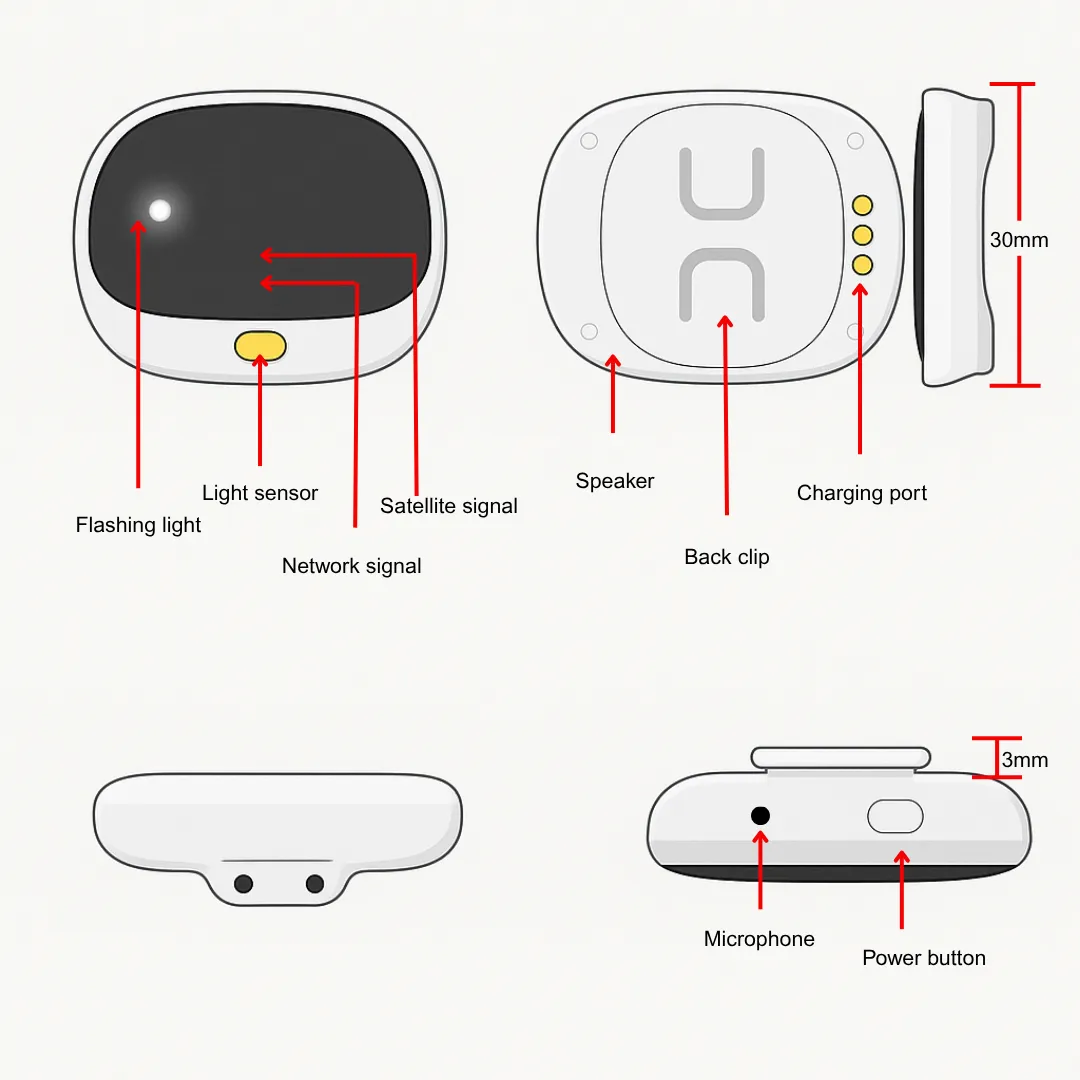
Step 1: Learn your Petverse Woof Details
Step 2: Switch device on
1. Please use the magnetic charger provided to charge the device.
2. Press & hold power button for 5 to 7 seconds to turn it on. (When the front blue and red lights stay on for 2 seconds, release the button).
Step 3: Install the Petverse App
1. The pet-owner needs to scan the QR code below with smart phone to download and install the tracking app.
2. Login to the app with the 10-digit ID number on the back of the device. The default password is 123456.

Google Play Store

Apple App Store
Step 4: Checking Location
Step 5: App Settings
Real-time location tracking and interval for uploading:
Display on the last location of the GPS tracker. For the last location, press the “single refresh” button on the map, top right. Press the “interval for uploading” and choose the different interval times.
Geo-fence:
Add, check or cancel GPS-fence area. When the device gets into or out of the GPS-fence the app will get an alert. (Note: we suggest a radius of GPS-fence over 300m to reduce false alerts).
WIFI-fence:
You can set 2 WIFI safe zones. When device leaves safe WIFI zones, the app will give a notification.

Powering off your device
1. When there is no SIM card in the tracker, press the power button for 5 to 7 seconds, till a ringtone sounds, to switch it off.
2. When there is a SIM card in the device, to avoid others interfering with your device, it can only be turned off via the app.
Health: Check your pet’s health status, including steps and energy consumption.
Talk: Call to Petverse device: To call your pet tracker when click it.
Settings: All settings need to work when app shows the device is online with the SIM card’s data plan.
About the device: check and edit the tracker’s information.
Change password: change app and web platform’s password.
Set SOS number: preset SOS numbers to monitor the sound around tracker. (Note: for privacy of tracker user, non-SOS numbers cannot call the tracker).
Sensor light: turn on or off the sensor lights on tracker. Or to enable them to be on automatically in dark surroundings to make it easier to find the tracker.
Signal light: turn the signal indicator lights on or off, on the tracker.
Find your pet: when activate this function the tracker will send out ringtone for being found easily.
Device language and time zone: set tracker SMS alerts’ language and time zone. Options are Chinese and English.
Remote reboot: to reboot the tracker from this setting.
Remote power-off: To power off the tracker remotely.
Factory reset: To default the device back to factory settings.
Alarm list: to list all alerts sent by tracker.
Reminder: To turn on /off notifications / modes
Logout: Log off from the app and no more notifications from app.
Attention:
FAQs:
1. Use this tracker in an area with good network signal.
2. For better performance, charge the new device for 3 hours before using.
3. Standby time: When the location uploading time is every 10 minutes, the standby time is 4 days and talking time is 6 hours (actual test).
When the app and web function is turned off, the standby time is about 9 days. (This test data is based on a strong telecom network).
4. To extend the battery life, please charge and discharge the tracker fully at least one time in 3 months.
5. To make sure it is water-resistant, please cover the device with the protective silicone cover.
6. The tracker is waterproof IP67, but we do not suggest submersing it in water for a long time, or to swim with it.
7. Please do not open the tracker case by yourself as it might affect the waterproof and lose the right to warranty.
8. The tracker uses cell tower signal (LBS/GSM) or WIFI when indoors. The locating accuracy depends on the tracker distance to tower and other factors, like metal and surroundings.
9. Due to these above restrictions and influences of the use environment, the equipment may have deviations in positioning. This is not a quality problem, and is not subject to after-sales processing.
10. There will not be notifications of the hardware upgrades and app function adjustments.
Q: Device shows online, but it shows “wait for the device responses” when you make settings with the app?
A: a) the device SIM signal is not good or has poor GPRS data.
b) the device is busy in other processes. Please wait a minute and try again.
Q: The device still shows “not enabled” or “offline”?
A: It needs to configure APN data. We have pre-programmed most SIM card’s APN data, but some haven’t. Please set main monitoring number first by sending below command from your own phone to the tracker SIM number.
pw,123456, center,your own phone number#
After a reply, send the below command to set APN into the tracker. The command is:
apn,apndata,user,password,MCC MNC code#
Note: the parts of the command in bold are different according to the different SIM providers. If user and password are blank, delete them from the command. There is no space between them, and all the letters are in lowercase.
Hot Tips!!
The new device needs to be charged for more than 4 hours before use to achieve best effect.
When charging, please use the charger provided to avoid damage to the device.
If the device is not used regularly, please charge and discharge it once every two months.
After inserting the SIM card, please install the SIM card cover in the correct direction and then tighten the screws, otherwise the waterproof effect will be affected.
When using the device, please clean the charging contact regularly, otherwise it may not charge properly (wipe with clean, dry cloth).
The waterproof level of this device is IP67, but it cannot be immersed in water for a long time.
Please do not open the case of the device without permission, or the warranty will be lost.
You're all set! Your furry friend is now protected, connected and safe with PETVERSE!



Copyrights 2025 | Powered by Digital Suite Automate | Terms & Conditions | Privacy Policy
Facebook
Instagram
LinkedIn
Youtube
TikTok